


Two weeks ago we got what looked like a good lead. It came through the contact form on this site, from a Houston energy company, saying they needed to redesign and promote their website. Our lead classifier scored it as a real buyer. I called, left a voicemail, and emailed my calendar link.
The reply came back a couple hours later. Company policy, they use their own calendar. Here's the Calendly. Once you've booked, reply with the email address you used so we can confirm.
The "Calendly" link went to stage3.wpengine-hightecenergy.com.
That domain was registered on August 7. It is not WP Engine's domain, WP Engine staging sites live on wpengine.com. It is not Calendly's either. It is a lookalike built to look like an agency's own staging environment, with a token in the URL that is unique to the target. We did not click it.
On Monday the second one arrived. Same script, different company. This time the sender was "Marigold Kinsley" at Universal Building Materials, a real lumber yard in Houston that has had universalbuildingmaterials.com since 2012. The email came from universalbuildingmaterials.pro, registered one week earlier. The form was submitted from a browser in the Europe/Moscow timezone. The reply carried the same fake calendar link, this time on stage3.wpengine-universalbuildingmaterials.com, registered six days before the email.
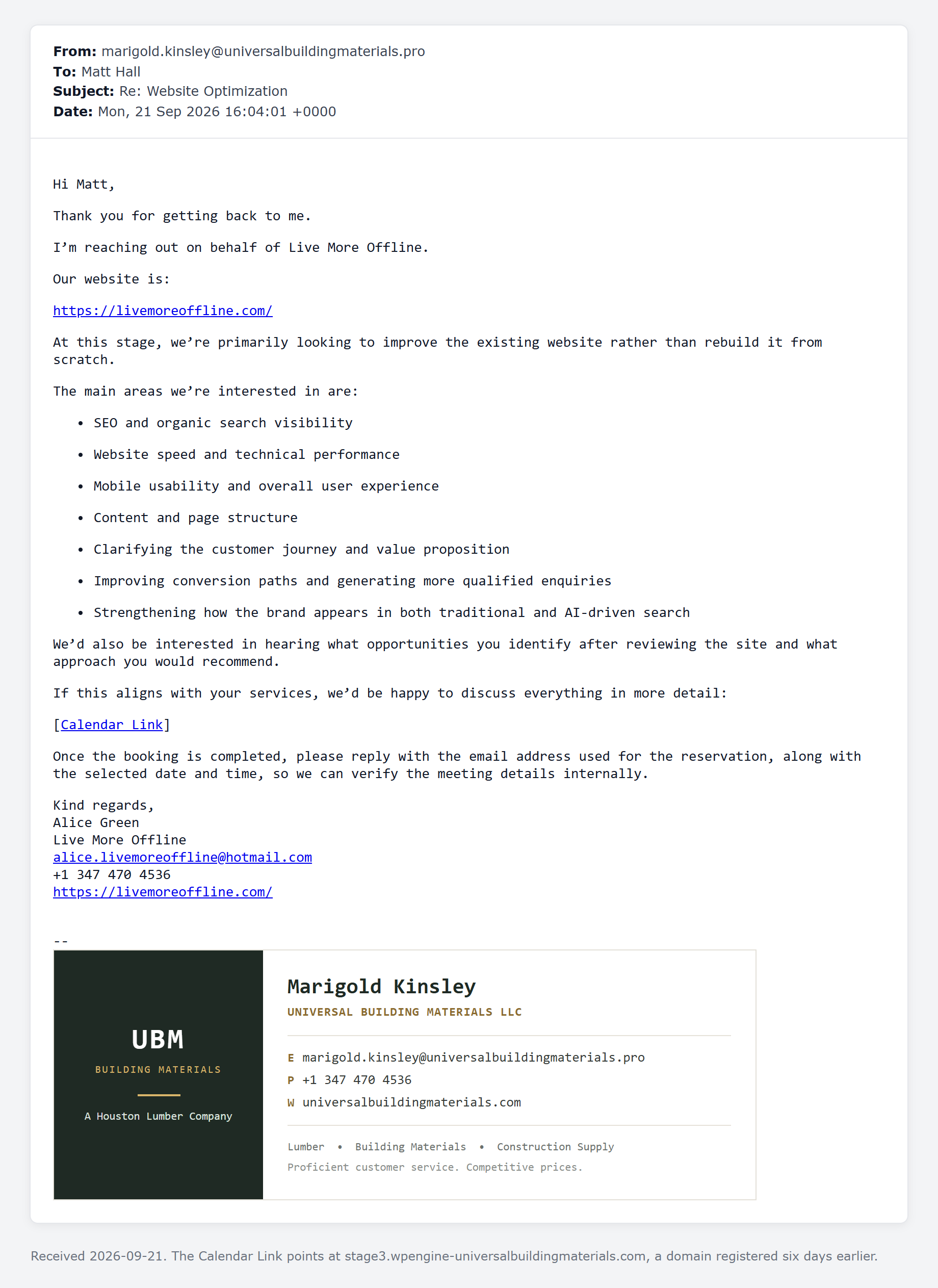
Both lookalike domains are at the same registrar and on the same pair of Cloudflare nameservers. One operator, one campaign, a fresh domain per target brand. The second email was sent through a legitimate email service on Amazon SES, so SPF, DKIM and DMARC all passed. Gmail did not blink.
Why it gets through
Every filter we have, and probably every filter you have, reads the message. And the message is fine. "We need to redesign and promote our website" is exactly what a real buyer writes. The payload is not in the message. It arrives one reply later, after you have already invested a phone call and an email and you are primed to book.
The tells were all in places nobody reads:
- The sender's domain was 7 days old. A real business has a domain that is years old.
- The TLD was .pro while the real company is a 14 year old .com.
- The name on the form (Alice Green) did not match the mailbox (marigold.kinsley@).
- The first one used a free mailbox with the company name jammed into it (john.hightecenergy@outlook.com).
- The form was submitted from a timezone the company does not operate in.
Any one of those alone is nothing. A real contractor uses a Gmail address with his business name in it. Two or three together, on a lead that then insists on its own calendar, is the pattern.
What we did
We deleted both contacts, reported the domains to their registrars, the fake site to Cloudflare and Google Safe Browsing, and the sending account to the email service that carried it.
Then we rewrote the thing that let it through. Our router already read the message. It is being changed to read the sender too: the domain's registration date, whether a .pro or .xyz is sitting next to an older .com with the same name, whether the name on the form matches the mailbox, and the timezone the form was submitted from. Two or more of those and the lead gets held and I get a Slack message with the reasons, so a real buyer on a new domain still gets seen by a human. Replies get their links checked as well: a host with wpengine- or calendly in a domain that is not WP Engine's or Calendly's quarantines the contact before anyone books anything.
That last part matters more than the detection. A filter that silently drops a real buyer costs more than a phishing email ever will, so nothing here deletes anything. It holds, and it tells me why.
What to check before you book
Hover the calendar link. If it does not go to calendly.com, calendar.google.com, or a booking tool you recognize, stop. Nobody's company policy requires you to book on a subdomain of a domain that did not exist last month.
Look at the sender's domain, not the signature block. The signature will say the real company. The domain will be one character off, or a different TLD, or a free mailbox.
And notice the ask. "Reply with the email address you used to book" is not something a buyer says. It is the point of the exercise.
The first one reached us through a Clutch referral link, so they are working the agency directories. If you run an agency and one of these landed in your inbox, I'd like to see it. Forward it to matt@sceptermarketing.com. The two we have are the same operator and I doubt the list stops at us.


